# Integrations - Subscription apps

{% hint style="info" %}
**Available from Professional plan**
{% endhint %}

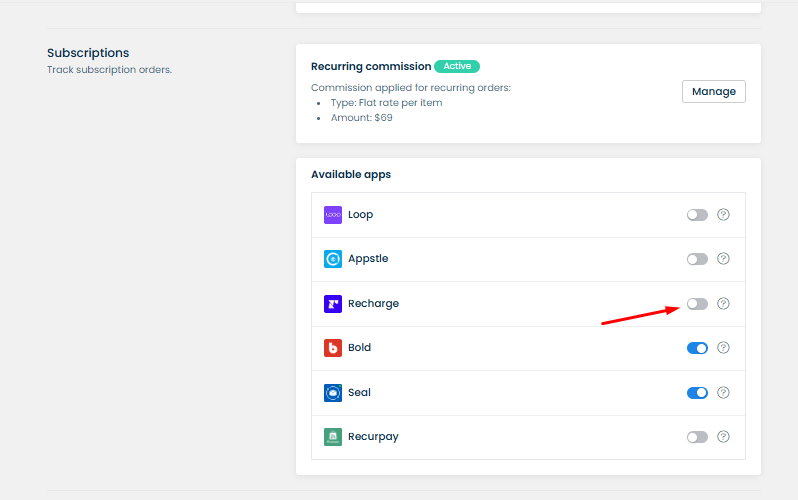
If your store has some subscription-type products, your affiliates can get commissions for referring them just like regular products. However, by default, <mark style="color:red;">UpPromote</mark> will only track the **first subscription orders**. The **recurring orders** will not be tracked, thus not bringing affiliates any commission for those.

If you want to give affiliates commissions on recurring orders as well, <mark style="color:red;">UpPromote's</mark> subscription-order service integrations can help.

Currently, UpPromote offers five subscription-order service integrations: **Loop,** **Appstle**, **Recharge**, **Bold**, **Seal**, and **Recurpay.**&#x20;

**Note:** Currently, UpPromote subscription tracking **does not work** with the **product-swap** feature (except for Recurpay, Loop). Please be aware of this when setting up subscription integration.&#x20;

<figure><img src="https://2915776664-files.gitbook.io/~/files/v0/b/gitbook-x-prod.appspot.com/o/spaces%2F-LnqRFg4of77qA6qOdUp%2Fuploads%2F0DRLOX781atOAkkgmYRb%2Fimage.png?alt=media&#x26;token=4b94ae16-f525-4edb-a651-1b852867f132" alt=""><figcaption></figcaption></figure>

## Integration Setup Guide

### Appstle Integration

To track subscription orders from **Appstle Subscriptions**, you can enable **Appstle integration**. Simply go to **Settings** > **Integration** > **Subscription / Payment app** > **Appstle** > Switch it on and select **Confirm to activate.**

<figure><img src="https://2915776664-files.gitbook.io/~/files/v0/b/gitbook-x-prod.appspot.com/o/spaces%2F-LnqRFg4of77qA6qOdUp%2Fuploads%2FGE4TU5fjP6yFNozJ08I8%2Fimage.png?alt=media&#x26;token=e32b2c03-c946-4c53-bbf1-13238ead6147" alt=""><figcaption></figcaption></figure>

<figure><img src="https://2915776664-files.gitbook.io/~/files/v0/b/gitbook-x-prod.appspot.com/o/spaces%2F-LnqRFg4of77qA6qOdUp%2Fuploads%2FEHgj5Fgsedhf5Ah1ZbVz%2Fimage.png?alt=media&#x26;token=26c6b8bf-5943-48fa-a304-f0021455b4ba" alt=""><figcaption></figcaption></figure>

### Recharge Integration

If you are using **Recharge** payment in your shop, select toggle and click **Continue to setup** to integrate with **Recharge**.&#x20;

<figure><img src="https://2915776664-files.gitbook.io/~/files/v0/b/gitbook-x-prod.appspot.com/o/spaces%2F-LnqRFg4of77qA6qOdUp%2Fuploads%2FAdn4z4xKo2IeaVASRNln%2Fimage.png?alt=media&#x26;token=9ab57490-17f3-48fd-bb0d-5de428948d25" alt=""><figcaption></figcaption></figure>

<figure><img src="https://2915776664-files.gitbook.io/~/files/v0/b/gitbook-x-prod.appspot.com/o/spaces%2F-LnqRFg4of77qA6qOdUp%2Fuploads%2FAxWfFVZJTZEZdfhH8Nwl%2Fimage.png?alt=media&#x26;token=85c6fd96-7f65-4d4b-9e40-2d67fce07623" alt=""><figcaption></figcaption></figure>

Then you will need to confirm your integration:

<figure><img src="https://2915776664-files.gitbook.io/~/files/v0/b/gitbook-x-prod.appspot.com/o/spaces%2F-LnqRFg4of77qA6qOdUp%2Fuploads%2FRZihbah6Tk48p0chGTg1%2Fezgif-4-cc0d21df47.png?alt=media&#x26;token=c105410a-3010-4165-8e56-07822f9f8a43" alt=""><figcaption></figcaption></figure>

### Bold Integration

If you are using **Bold Subscriptions**, set up Bold subscriptions integration in **Settings** > **Integration** > **Bold subscriptions >** Switch it on and **select Confirm to activate** to track recurring orders on your shop.

<figure><img src="https://2915776664-files.gitbook.io/~/files/v0/b/gitbook-x-prod.appspot.com/o/spaces%2F-LnqRFg4of77qA6qOdUp%2Fuploads%2FVSiVXuEc1m1A1QyNziS8%2Fimage.png?alt=media&#x26;token=24ccc93e-58a7-441a-9640-ef0f25f5fce6" alt=""><figcaption></figcaption></figure>

<figure><img src="https://2915776664-files.gitbook.io/~/files/v0/b/gitbook-x-prod.appspot.com/o/spaces%2F-LnqRFg4of77qA6qOdUp%2Fuploads%2FEOgGi73v2jJesF3ehgsb%2Fimage.png?alt=media&#x26;token=98f43c73-354b-48b1-a924-702a42ab0dfb" alt=""><figcaption></figcaption></figure>

#### 1. Bold ver 2

For the **new Bold subscription** app (that is integrated with Shopify Checkout), you can just turn on the setting to track recurring orders.

In case you only want to contribute commissions for affiliates for the first order (not the recurring ones), you can keep this setting off, and our system will track the first order as usual.

<figure><img src="https://2915776664-files.gitbook.io/~/files/v0/b/gitbook-x-prod.appspot.com/o/spaces%2F-LnqRFg4of77qA6qOdUp%2Fuploads%2F2DtKmoBZQSXTRWNzPwqj%2Fimage.png?alt=media&#x26;token=2e75d19e-ef10-4c9e-8baa-9bc2b8b4c228" alt=""><figcaption></figcaption></figure>

#### 2. Bold ver 1

If you are using the **old Bold subscription** version (which is not integrated with Shopify Checkout yet), please follow these steps to configure the integration:

Copy the following code and go to **Bold** subscription app > **Integrations** > **View all integrations** > enable **Advanced tracking scripts** and paste the code into the **Script box**.

```
 <script>
var scaBoldObject = {
    order_name:"[order_name]",
    total:"[total]",
    subtotal:"[subtotal]",
    customer_email:"[customer_email]",
    customer_id:"[customer_id]",
    shop:"[myshopify_domain]",
    line_items:products_json
}

fetch('https://af-test.uppromote.com/api/webhook/bold/tracking', {
    method: 'post',
    body: JSON.stringify(scaBoldObject)
    }).then(function(response) {
      return response.json();
    }).then(function(data) {

});
</script>
```

<figure><img src="https://2915776664-files.gitbook.io/~/files/v0/b/gitbook-x-prod.appspot.com/o/spaces%2F-LnqRFg4of77qA6qOdUp%2Fuploads%2FcigeFmqfNV0dNvZ2JtC5%2Fezgif-4-19252b37b3.jpg?alt=media&#x26;token=885dccec-663f-40c5-bee6-a9bef1350223" alt=""><figcaption></figcaption></figure>

After that, click **Save** and the integration will be enabled.

### Seal Integration

To track subscription orders from [**Seal Subscriptions**](https://apps.shopify.com/seal-subscriptions), you can enable **Seal integration**. Simply go to **Settings** > **Integration** > **Subscription / Payment apps** > **Seal >** switch it on and select **Continue to setup >** Select **Confirm to activate**. Then, UpPromote will start track recurring orders from Seal (by default, the system still tracks the first orders).

<figure><img src="https://2915776664-files.gitbook.io/~/files/v0/b/gitbook-x-prod.appspot.com/o/spaces%2F-LnqRFg4of77qA6qOdUp%2Fuploads%2Fg2A8mayQmLG9vtWIWNSj%2Fimage.png?alt=media&#x26;token=2f7c1b78-0a7c-441d-9cd0-93e69c44773f" alt=""><figcaption></figcaption></figure>

<figure><img src="https://2915776664-files.gitbook.io/~/files/v0/b/gitbook-x-prod.appspot.com/o/spaces%2F-LnqRFg4of77qA6qOdUp%2Fuploads%2FvUclpVQ9puASMwetgP7K%2Fimage.png?alt=media&#x26;token=cd3b04a6-218e-4a14-a08b-49f785beba6c" alt=""><figcaption></figcaption></figure>

<figure><img src="https://2915776664-files.gitbook.io/~/files/v0/b/gitbook-x-prod.appspot.com/o/spaces%2F-LnqRFg4of77qA6qOdUp%2Fuploads%2F5qhq8OImPtLg1uklTsxs%2Fimage.png?alt=media&#x26;token=7b36d416-34e4-4e28-aaa9-32bae21318a7" alt=""><figcaption></figcaption></figure>

Next, go to the **Seal subscription** app > **Settings** > **General settings** > enable **Tag new and subsequent subscription orders** > use recommended tag from Seal > **Save changes**.

<figure><img src="https://2915776664-files.gitbook.io/~/files/v0/b/gitbook-x-prod.appspot.com/o/spaces%2F-LnqRFg4of77qA6qOdUp%2Fuploads%2FgkNhstqdoq9fcsR319yN%2Fezgif-4-0850bbe367.jpg?alt=media&#x26;token=08114f66-1399-48df-a362-a35c24842994" alt=""><figcaption></figcaption></figure>

### Recurpay integration

To track subscription orders from **Recurpay Subscription**, you can enable **Recurpay integration**. Simply go to **Settings** > **Integration** > **Subscription / Payment app** > **Recurpay** > Switch it on and select **Confirm to activate**

<figure><img src="https://2915776664-files.gitbook.io/~/files/v0/b/gitbook-x-prod.appspot.com/o/spaces%2F-LnqRFg4of77qA6qOdUp%2Fuploads%2FGJxLgqoWVoKxmHrhotNV%2Fimage.png?alt=media&#x26;token=0c783006-11c6-4154-baf1-7a2d216ad33e" alt=""><figcaption></figcaption></figure>

<figure><img src="https://2915776664-files.gitbook.io/~/files/v0/b/gitbook-x-prod.appspot.com/o/spaces%2F-LnqRFg4of77qA6qOdUp%2Fuploads%2F2mba8rOgyIi8GiPJT3AI%2Fimage.png?alt=media&#x26;token=39963d59-0d99-45e1-80a4-eb8a7f13964e" alt=""><figcaption></figcaption></figure>

### Loop Integration

To track subscription orders from **Loop subscription,** you need to:

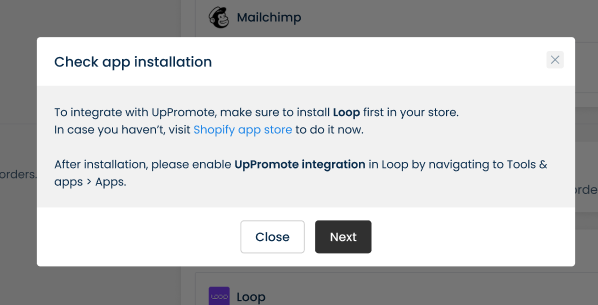
* Step 1: Open Loop app, enable **UpPromote integration**: Find **Tools & apps** > **Apps** > Find **UpPromote** and select **Connect**&#x20;

<div data-full-width="false"><figure><img src="https://2915776664-files.gitbook.io/~/files/v0/b/gitbook-x-prod.appspot.com/o/spaces%2F-LnqRFg4of77qA6qOdUp%2Fuploads%2F23JYzzQekOONuGvOkcAe%2Fimage.png?alt=media&#x26;token=0da232cf-38fc-438b-91fe-a48a5d218bd0" alt=""><figcaption></figcaption></figure></div>

Open **Set up instructions** > Click **Connect**

<figure><img src="https://2915776664-files.gitbook.io/~/files/v0/b/gitbook-x-prod.appspot.com/o/spaces%2F-LnqRFg4of77qA6qOdUp%2Fuploads%2FT77zmRJKLhYeTMxmMCvz%2Fimage.png?alt=media&#x26;token=7db7531a-3ac4-4b89-b96c-6efb7affd465" alt=""><figcaption></figcaption></figure>

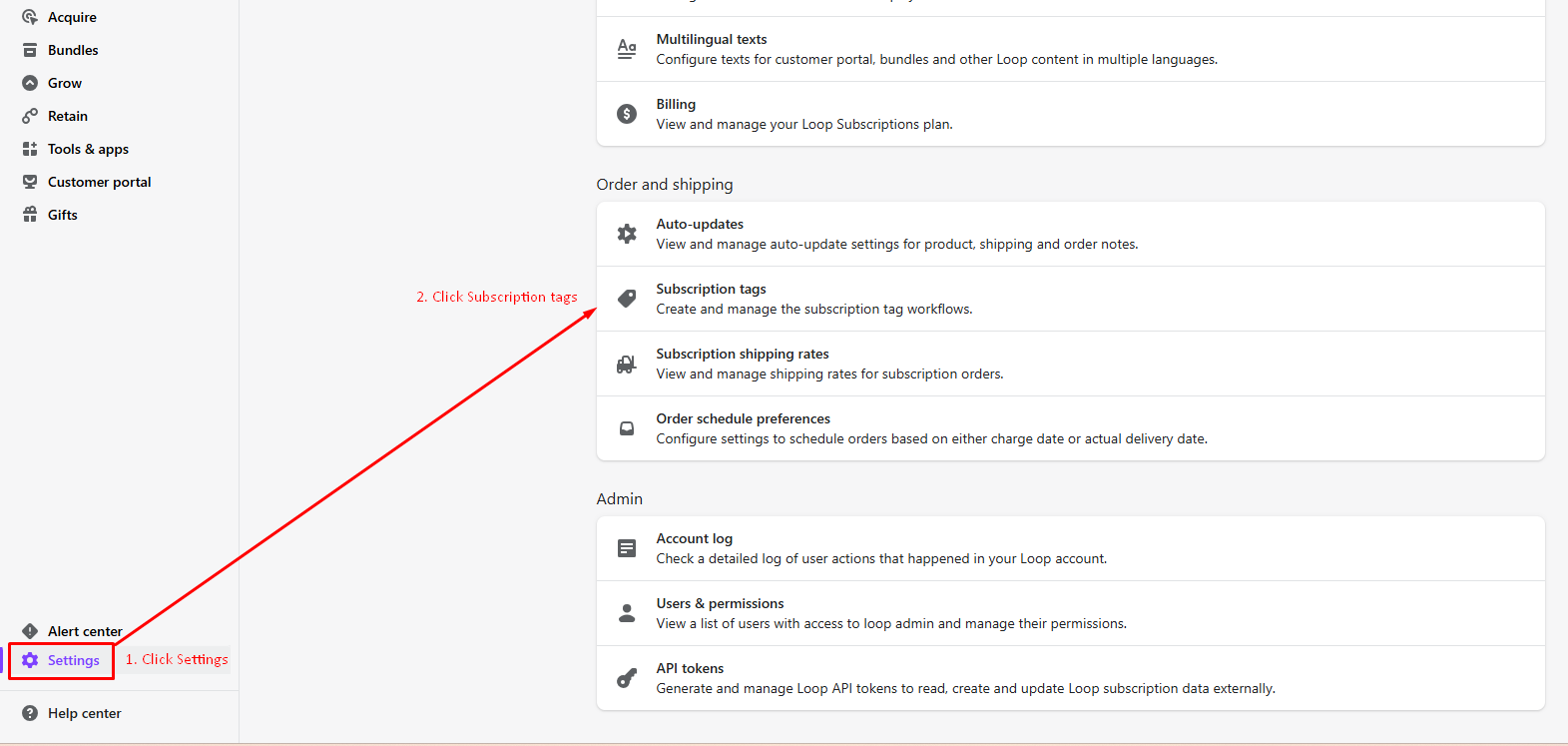
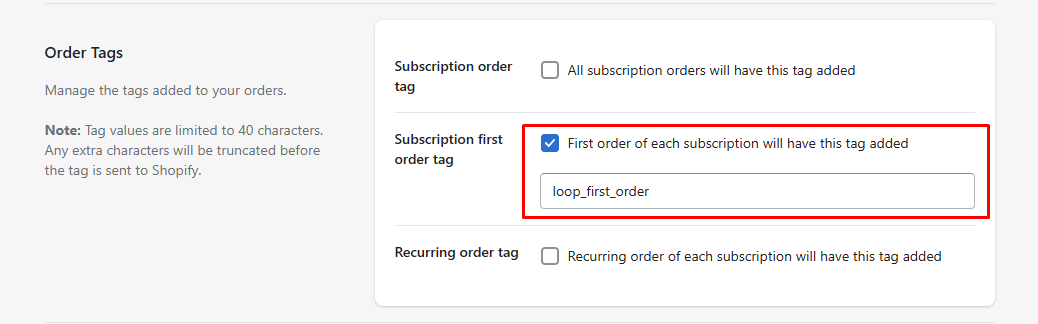
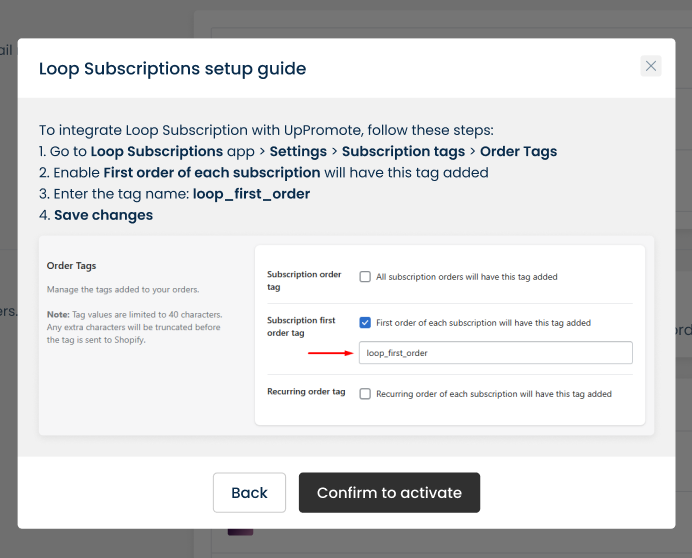
* Step 2: Open Loop **Settings** > Find **Subscription tags** > Enable **Subscription first order tag** & enter tag: **loop\_first\_order** > Save.

{% hint style="warning" %}
Please enter the exact value: **loop\_first\_order** for Loop subscription first order tag!
{% endhint %}

<figure><img src="https://2915776664-files.gitbook.io/~/files/v0/b/gitbook-x-prod.appspot.com/o/spaces%2F-LnqRFg4of77qA6qOdUp%2Fuploads%2Fnyv0GZGR8lveT5if3DY2%2Fimage.png?alt=media&#x26;token=0cd958a1-eada-4b20-8c0f-b1f4c6c3323d" alt=""><figcaption></figcaption></figure>

<figure><img src="https://2915776664-files.gitbook.io/~/files/v0/b/gitbook-x-prod.appspot.com/o/spaces%2F-LnqRFg4of77qA6qOdUp%2Fuploads%2FrpNwoLrMREaHSgUXFjfd%2Fimage.png?alt=media&#x26;token=31098f66-4792-4e1b-8da3-a52d2093685a" alt=""><figcaption></figcaption></figure>

* Step 3: Open UpPromote, go to **Settings** > **Integration** > **Subscriptions** > **Loop >** Click toggle, select **Next** and select **Confirm to activate.**&#x20;

<figure><img src="https://2915776664-files.gitbook.io/~/files/v0/b/gitbook-x-prod.appspot.com/o/spaces%2F-LnqRFg4of77qA6qOdUp%2Fuploads%2FXWyMjdx9RTl0D8603bZZ%2Fimage.png?alt=media&#x26;token=f1114713-cd72-472b-9085-9c649d5c2af4" alt=""><figcaption></figcaption></figure>

<figure><img src="https://2915776664-files.gitbook.io/~/files/v0/b/gitbook-x-prod.appspot.com/o/spaces%2F-LnqRFg4of77qA6qOdUp%2Fuploads%2FieIj8ITRwtQv4QH13A44%2Fimage.png?alt=media&#x26;token=1383c9f6-0c28-4b55-b5a7-92a3d9d9d50f" alt=""><figcaption></figcaption></figure>

<figure><img src="https://2915776664-files.gitbook.io/~/files/v0/b/gitbook-x-prod.appspot.com/o/spaces%2F-LnqRFg4of77qA6qOdUp%2Fuploads%2FJtQDI5Ym2VwaA2ox3HAd%2Fimage.png?alt=media&#x26;token=218f072f-fe43-40ee-8b56-9e2b3daba671" alt=""><figcaption></figcaption></figure>

### Skio integration

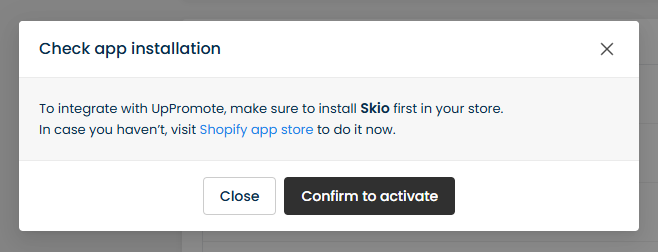
To track subscription orders from **Skio subscription,** you can enable **Skio integration**. Simply go to **Settings** > **Integration** > **Subscriptions** > **Skio** > Switch it on and select **Confirm to activate**

<figure><img src="https://2915776664-files.gitbook.io/~/files/v0/b/gitbook-x-prod.appspot.com/o/spaces%2F-LnqRFg4of77qA6qOdUp%2Fuploads%2FO4KDeBBxRxUZfCvwTObn%2Fimage.png?alt=media&#x26;token=eaf200d2-ca13-4065-bb29-3a2fe1d86d2d" alt=""><figcaption></figcaption></figure>

## Subscription commission setup

By default, affiliates will receive the same commission amount as other one-time orders. If you want to setup **different commission for first order and recurring orders** of those subscription apps, <mark style="color:red;">UpPromote</mark> can help!

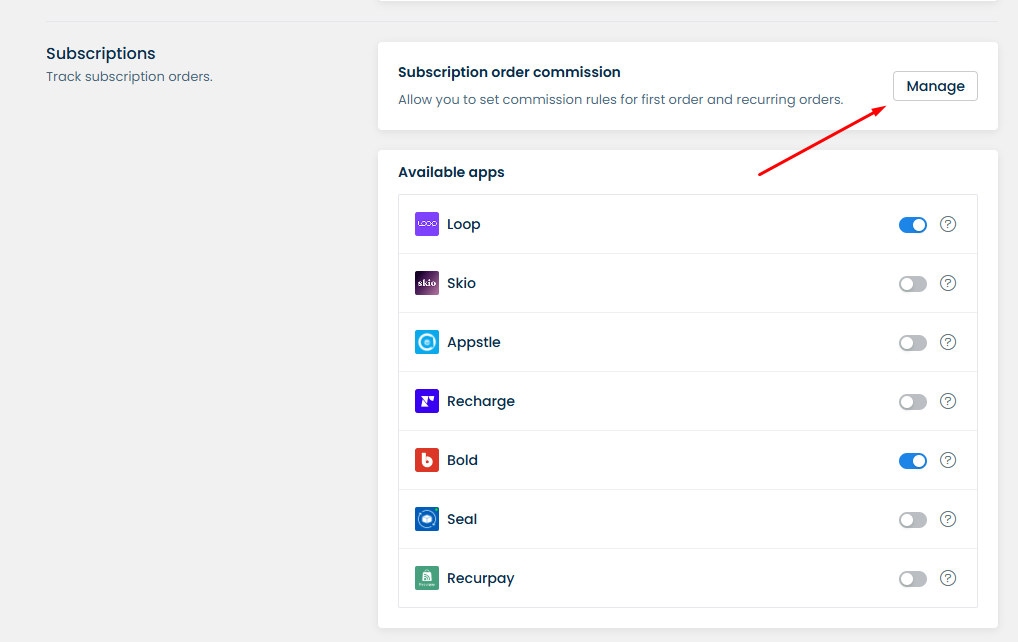
**Step 1:** Find **Subscription order commission >** Select **Manage** to configure first order and recurring order commission

<figure><img src="https://2915776664-files.gitbook.io/~/files/v0/b/gitbook-x-prod.appspot.com/o/spaces%2F-LnqRFg4of77qA6qOdUp%2Fuploads%2FE2ywPfIeC0ihAH3l4Fub%2Fimage.png?alt=media&#x26;token=38d853cc-700c-43f8-843d-a02be7a2f3a7" alt=""><figcaption></figcaption></figure>

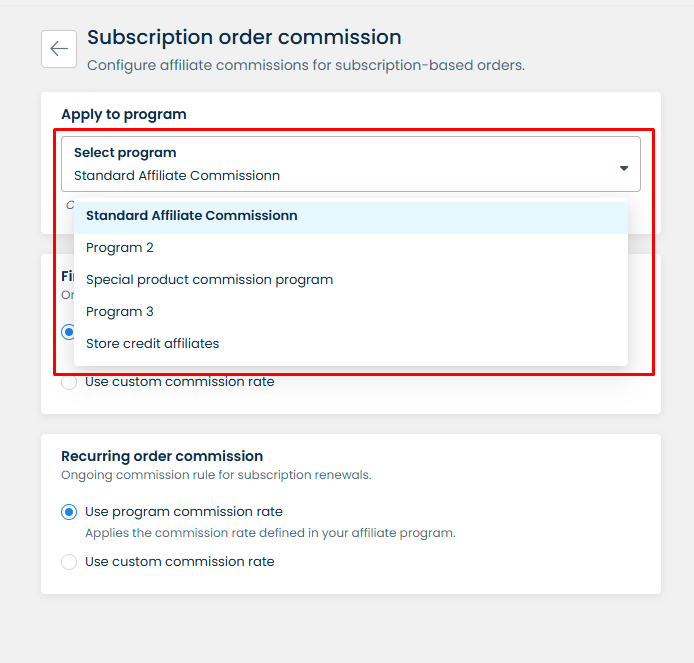
**Step 2: Select program** that you want to apply the custom commission for first order & recurring order.

<figure><img src="https://2915776664-files.gitbook.io/~/files/v0/b/gitbook-x-prod.appspot.com/o/spaces%2F-LnqRFg4of77qA6qOdUp%2Fuploads%2FQgZkElWvMiWpqWJrqQSH%2Fimage.png?alt=media&#x26;token=0f8e13bb-d23a-4361-ae88-16a6f92b89b9" alt=""><figcaption></figcaption></figure>

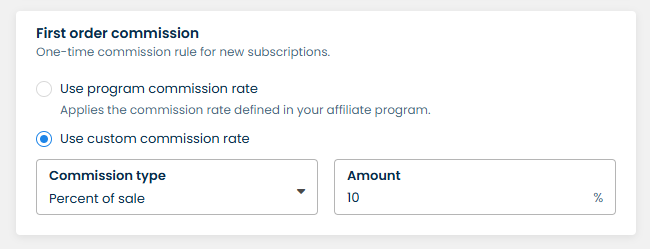
**Step 3:** For First order commission, you can select either 2 options:

* Use program commission (default): Applies the commission rate defined in your affiliate program.
* Use custom commission rate: Applies the custom commission rate for new subscriptions:&#x20;
  * Percent of sale
  * Flat rate per item
  * Flat rate per order

<figure><img src="https://2915776664-files.gitbook.io/~/files/v0/b/gitbook-x-prod.appspot.com/o/spaces%2F-LnqRFg4of77qA6qOdUp%2Fuploads%2FtaRZBC1anZWR3EdxmYrw%2Fimage.png?alt=media&#x26;token=20868006-6ba3-40d0-bdf6-7c7dbd4cdf38" alt=""><figcaption></figcaption></figure>

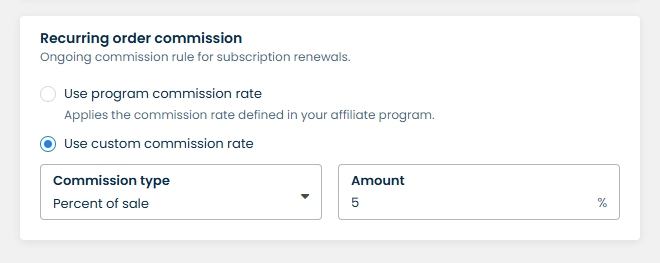
**Step 4:** For Recurring order commission, you can select either 2 options:

* Use program commission (default): Applies the commission rate defined in your affiliate program.
* Use custom commission rate: Applies the custom commission rate for subscription renewals:&#x20;
  * Percent of sale
  * Flat rate per item
  * Flat rate per order

<figure><img src="https://2915776664-files.gitbook.io/~/files/v0/b/gitbook-x-prod.appspot.com/o/spaces%2F-LnqRFg4of77qA6qOdUp%2Fuploads%2F5bUeYRXrgs1DC1SmEuDm%2Fimage.png?alt=media&#x26;token=1b3efc7e-7ca1-485f-99d1-5258bc1132f7" alt=""><figcaption></figcaption></figure>