> For the complete documentation index, see [llms.txt](https://docs.uppromote.com/llms.txt). Markdown versions of documentation pages are available by appending `.md` to page URLs; this page is available as [Markdown](https://docs.uppromote.com/guide-for-affiliate/affiliate-admin/affiliate-admin-commissions.md).
# Affiliate Admin - Commissions
The Commission tab in the UpPromote affiliate account shows every referral's status, from Pending to Paid. Open Detail to see how each commission is calculated.
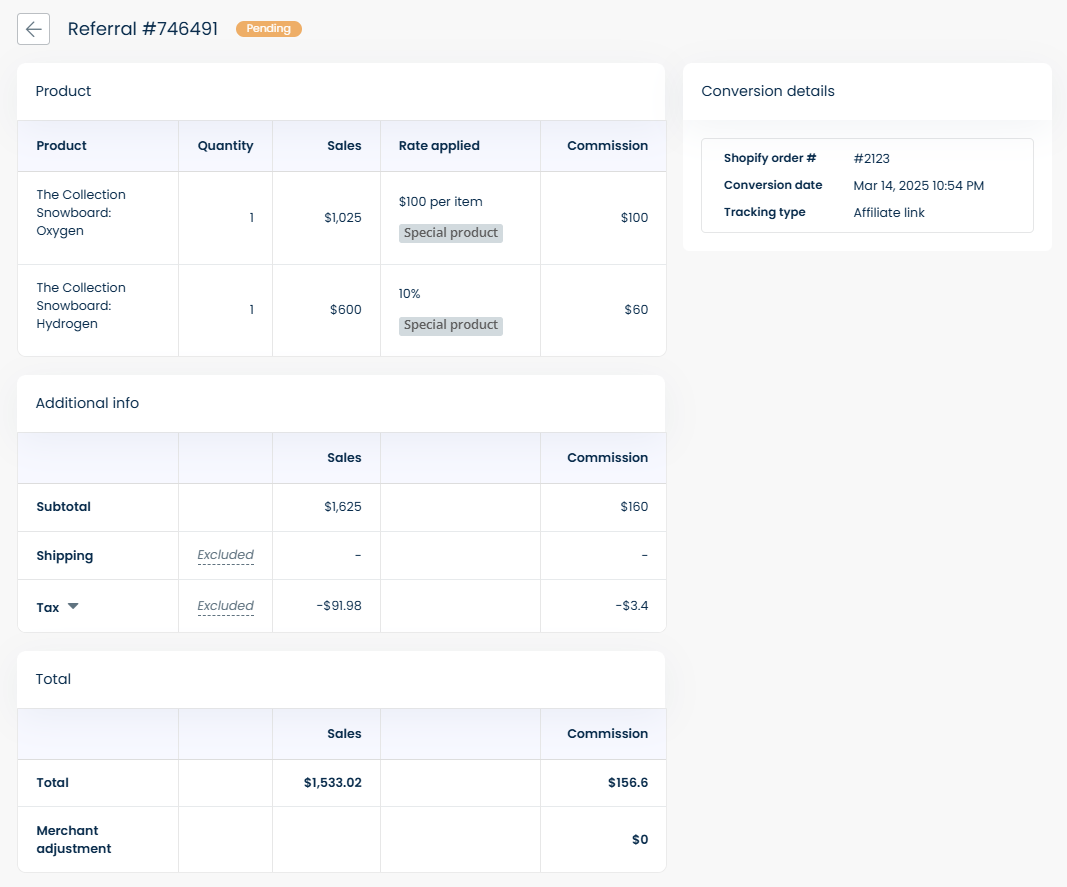
In **Commission,** you can see the status of all referrals recorded (including *Approved/Denied/Paid or Pending* referrals). Click **Detail** to see more information about each referral.
The **Referral details** page provides you with a summary of their referral performance and commission calculation. Here's an overview of the sections:
1. **Referral overview**: Displays the referral ID and status (e.g., Pending, Approved, Denied).
2. **Product information**: Shows details of the product sold, including quantity, sales amount, commission rate, and commission earned.
3. **Additional information**: Includes data such as subtotal, shipping, and tax, which contribute to the final commission calculation.
4. **Total information**: Summarizes the total sales and commission for the referral, including any merchant adjustments.
5. **Conversion details**: Displays the Shopify order ID, conversion date, and tracking type, providing details of the referral's conversion.